01 · The screenBASIC
The connection screen
Every setup starts in the same place. The screen groups the brands by how they're used, not alphabetically: at the top the three plugs that cover 90% of cases, then advanced control, and at the end the integrations we built with help from the community.
- 01Open the ☰ menu and tap Add device. You can also get there from the + Connect device button on the DEVICES card on the Dashboard.
- 02Pick the brand. Each card opens its own path: some ask for the username and password of the manufacturer's app, others for a code, others for scanning a QR.
- 03However you get there, you'll end up picking a zone and a role. That part is the same for all of them.
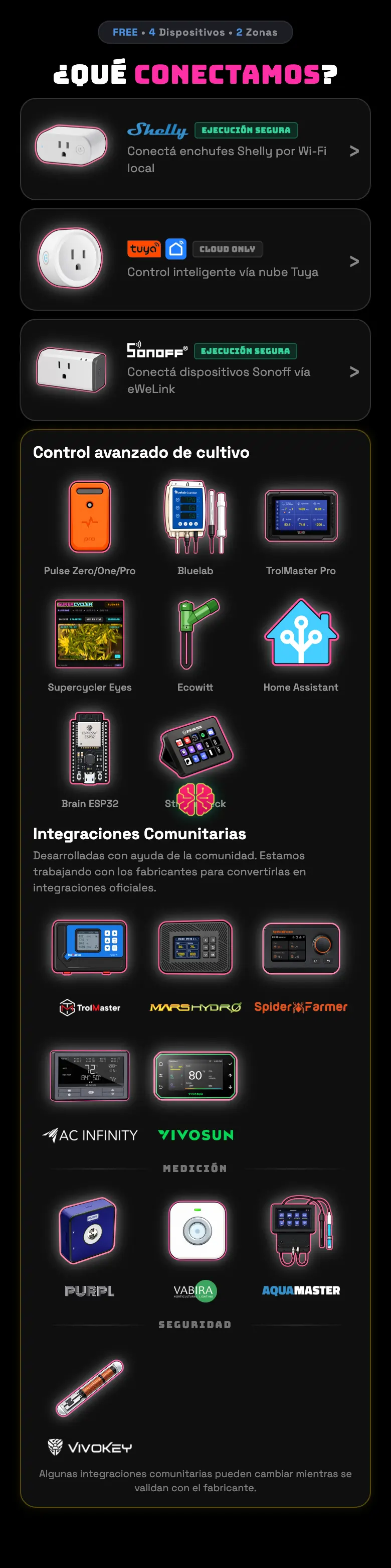
The five groups
- Plugs
- Shelly, Tuya and Sonoff. These are the ones that turn things on and off: lights, pumps, exhaust fans. If you have to pick just one, pick from here.
- Advanced grow control
- Sensors and serious grow gear: Pulse, Bluelab, TrolMaster Pro, the Eyes camera, Ecowitt, Home Assistant, our own ESP32 board and the Stream Deck.
- Community integrations
- Controllers from grow brands — TrolMaster, Mars Hydro, Spider Farmer, AC Infinity, VIVOSUN. We built them by reading their clouds, not through a signed agreement: they work, but they can change whenever the manufacturer touches something.
- Measurement
- Purpl Pro (THC/CBD), VABIRA (PAR meter) and Aqua Master (pH/EC). They only read: they don't control anything.
- Security
- The VivoKey implant, which is a way to log into the app, not a piece of equipment in the tent.
Do this
Connect the light first. It's the device everything else hangs off — the grow day, synced irrigation, the night thresholds.
Avoid this
Don't add ten things at once. Connect one, check that it responds with the test button, and only then move on to the next. That way, if something goes wrong, you know which one it is.
How urgent it is
EssentialOne device connected and responding.
ImportantThe right role on each one.
OptionalWhatever other brands you have.